


Smarters Pro
3.9244.00 Reviews
App Specs
- Version
- 2.1.4
- Updated On
- License
- Free
- Downloads
- 5,000,000+
- Developer
- Tech Smarters
- Categories
- Video Players & Editors
- Platform
- Android, iOS
Screenshots
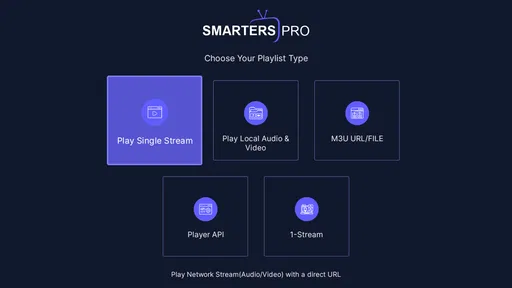
 Analysis by AppCompare
When I first try a media player, I’m looking for a quick route from opening the app to finding something worth watching. Smarters Pro makes a strong first impression if you already have the credentials and viewing sources you want to use: it brings live TV, films and series into one place rather than asking you to jump between separate players. That convenience is appealing in the first few days, though it depends on having access to suitable content in the first place. The app is a player, not a promise that every channel or title will be available automatically.
The first-week appeal: one place to browse
My early impression is that the appeal comes less from a single standout trick than from gathering different kinds of viewing in a familiar interface. I can move between a live channel, a programme guide and on-demand sections without treating each one as a separate app. For someone who already watches a mix of scheduled TV and series, that can make the first week feel pleasantly simple.
The app is free to download, is rated for Everyone, and is developed by Tech Smarters. It sits in the video-player and editing category, although its practical role here is as a media player. The current version is 2.0.9, and it runs on Android 5.0 or later. Its 3.8 average from around 9.9 thousand ratings suggests a mixed rather than universally smooth experience; I’d treat that as a reason to test it with my own setup, not as a verdict on how it will perform for me.
Who gets lasting value from it
I can see Smarters Pro earning a place on a phone or tablet for someone who regularly uses several types of media source and values having them organized together. A household member who checks live listings before choosing a programme may appreciate the EPG, while a film watcher may prefer browsing the on-demand area. The app’s reported install count is over one million, which shows that this style of player has found an audience, but popularity alone won’t make it useful if your viewing habits are simple.
A realistic use case is settling in after work, checking the guide to see what is on, then switching to a series when nothing live catches your interest. The benefit is fewer app changes and one interface to learn. If you mostly watch through a single mainstream streaming service, though, that service’s own app may be easier: its catalogue, account and recommendations are already connected, while a separate player adds another setup step.
Month-to-month value depends on routine
The app’s lasting value is about whether I return to its different sections often enough to justify keeping it installed. The first-week novelty of exploring a guide or changing the layout will fade; a dependable routine is what matters. If I check live programming most evenings and also use on-demand content, the combined browsing can keep the app relevant. If I open it only occasionally, a familiar built-in video player or a dedicated streaming service may be less work.
There are in-app purchases listed at $5.99 per item, so I would check the purchase details shown in the app before paying for anything and decide whether it adds value to the way I actually watch. The free starting point makes it easier to assess the basic experience first. I wouldn’t spend simply because a feature sounds useful in theory: try the everyday workflow, note where the free version falls short for you, and make a decision based on that friction rather than on the promise of extra options.
Worth Reading Before You Choose

Flipboard Shows What News Apps Must Do Beyond the Feed

Switching to Android Auto Means Rethinking Your Driving Routine

Google Calendar Makes a Crowded Week Easier to Manage

Ludo King Makes the Most of the Minutes Between Plans

Baby Panda World Brings Quick Play to Modern Phones, but Its Game Library Feels Busy

ESPN’s Live Game View Makes Following Close Games Easier
Maintenance, setup and the parts that can tire you out
Getting started is straightforward when you already have working credentials: install the app and sign in. That does not remove the effort of keeping your viewing sources and account details in order. If something stops appearing, I would first check whether the source and login still work rather than immediately blaming the player. This distinction is useful with any media player, because it separates an app problem from a problem with the service or information it relies on.
For a smoother first session, I’d have the login details ready, test one live channel and one on-demand item, and only then spend time arranging the interface. That small sequence helps identify whether the basics work before customization becomes a distraction. The app supports external players, too, which gives people who already have a preferred playback option a possible alternative to the built-in route. The trade-off is another choice to configure; if the default experience is good enough, adding a second player may not improve anything.
EPG information is most useful when it is current and easy to scan, so I would judge it by whether it helps me choose something quickly rather than by how much information it displays. Parental controls can also matter in a shared household, but I’d take time to set and check restrictions before handing the device to a child. A control is only reassuring if the settings match what the family intends to block. These practical checks make more difference than changing colors or layouts for their own sake.
Not every viewer will enjoy having many sources and sections collected in one place. A long list can make browsing feel like work, and switching repeatedly between live and on-demand viewing can expose inconsistent organization. That is a meaningful trade-off: consolidation saves app-hopping, but it does not automatically create the tidy catalogue experience of a single service. If my priority is a carefully curated library with consistent artwork and recommendations, I would lean toward a dedicated subscription app instead.
My long-term verdict
Overall, I’d keep this kind of player installed when it supports a real habit, not just because its feature list looks broad. Smarters Pro is worth trying if you already have compatible credentials, want live and on-demand viewing in one interface, and are willing to spend a little time checking the setup. It is a weaker fit for someone expecting a ready-made catalogue, automatic recommendations, or a completely hands-off experience.
There are useful options here, including language switching, multiple-screen support, an EPG, parental controls, customization and external-player support. None of them guarantees uninterrupted playback: performance still depends on the internet connection and the viewing source. I would test during the times and on the network where I normally watch, rather than judging the app from one unusually good or poor session. That gives a more honest sense of whether it can become part of a routine.
Alright, folks. Let’s dive into the world of Smarters Pro, an app that's been making waves among streaming enthusiasts. If you’re anything like me and love having all your favorite shows and movies right at your fingertips, then this is an app you might want to check out. But before you hit that download button, let me take you through my experience using it.
What’s the Buzz About Smarters Pro?
So, I stumbled upon Smarters Pro during a casual scroll through the app store, and boy, am I glad I did! This app is essentially a media player, but with a twist. It lets you access live TV, movies, and series with ease. What sets it apart from other media players is its user-friendly interface and the fact that it supports a variety of formats. Whether you’re into live sports, binge-watching the latest series, or catching up on news, this app has got you covered.
Setting It Up: Easier Than Assembling IKEA Furniture
Installing the app is a breeze. I thought I’d need to jump through a million hoops, but nope! After downloading it, you just need to log in with your credentials. No fuss, no muss. The interface is sleek and intuitive, which means even if you’re not a tech whiz, you’ll find your way around in no time.
The app supports multiple screens and dynamic language switching, which I found particularly handy when I wanted to switch from English to Spanish for my abuela. Plus, it supports external players, so if you’re picky about your viewing experience, you’ve got options.
Features That Got Me Hooked
Here’s where Smarters Pro really shines. It’s loaded with features that make streaming a joy. Let’s break it down:
- EPG Support: The Electronic Program Guide (EPG) is a lifesaver. It’s like having a TV guide in your pocket, letting you see what’s on and coming up.
- VOD Section: For movie and series buffs, the Video on Demand section is gold. It’s well-organized and easy to navigate, making it simple to find exactly what you’re in the mood for.
- Parental Controls: If you’ve got kiddos running around, the parental control feature is fantastic. You can restrict certain channels and content, giving you peace of mind.
- Customization: You can tweak the interface to suit your preferences, from the layout to the color scheme. It’s all about making your viewing experience personal.
Performance: Smooth Sailing or Rocky Waters?
Performance-wise, Smarters Pro is pretty solid. I was pleasantly surprised by the streaming quality. No buffering, which is a huge win in my book. The app runs smoothly, even when flipping between channels or switching content types. However, like any app, your experience will depend on your internet connection. But hey, that’s the digital world we live in, right?
Is Smarters Pro Worth It?
In a word: Yes. If you’re looking for a reliable, user-friendly streaming app with a plethora of features, Smarters Pro is definitely worth considering. It’s like having a mini-cinema right in your pocket. Plus, the ability to customize and control your viewing experience makes it a standout choice.
But, as always, give it a test run yourself. Apps can be a bit like shoes – what fits me perfectly might not fit you the same way. So, dive in, explore the features, and see if it’s your cup of tea.
In conclusion, Smarters Pro has certainly earned a spot on my phone. It’s a robust app that caters to a wide range of viewing preferences. Whether you’re a casual viewer or a hardcore binge-watcher, it’s got something for everyone. So, are you ready to give it a whirl?
Pros
- User-friendly interface enhances navigation.
- Supports multiple streaming formats easily.
- High customization options for users.
- Efficient and quick loading times.
- Secure with regular updates.
Cons
- Limited free version features.
- Occasional ads can disrupt usage.
- Requires stable internet for HD.
- Some advanced features need payment.
- Initial setup may confuse beginners.
FAQs for Smarters Pro
What is Smarters Pro and what does it offer?
Smarters Pro is a comprehensive app designed to enhance the streaming experience on Android and iOS devices. It offers a user-friendly interface, allowing users to watch live TV, movies, and series from their IPTV service provider. The app supports multiple formats and provides features like parental controls, support for EPG, and a built-in media player.
Is Smarters Pro compatible with all IPTV services?
Smarters Pro is compatible with most IPTV services, provided they supply an M3U URL, Xtreme Codes API, or a playlist file. However, it is important to confirm with your IPTV provider if their service supports Smarters Pro, as the app itself does not provide any content or channels.
What are the system requirements for Smarters Pro?
To run Smarters Pro smoothly, your device should be running on Android 5.0 or higher, or iOS 9.0 or later. It also requires a stable internet connection for uninterrupted streaming. Ensure your device has enough storage space for the app and additional downloaded content.
Does Smarters Pro offer any in-app purchases or subscriptions?
While Smarters Pro itself is typically free to download, it may offer in-app purchases for enhanced features or functionalities. Additionally, content access depends on your IPTV service provider, which may have its own subscription fees. Always check both the app and your IPTV provider for any associated costs.
How do I set up my IPTV service on Smarters Pro?
Setting up your IPTV service on Smarters Pro is straightforward. Once you download the app, launch it and select 'Add User.' Enter the login credentials provided by your IPTV service, such as the M3U URL or Xtreme Codes API. Follow the on-screen instructions to complete the setup and start streaming.


